A custom firmware for the Echo Mini with Gapless playback
RECHO is a firmware for the Snowsky Echo Mini written from scratch: boot, storage, microSD, USB, display, DAC driver, FLAC and MP3 decoders and updater. Proper filesystem driver that allows sorting files in alphabetical order.
Only supported on the 8 GB model. It might work on a 512 MB device, but it might as well brick it. Make sure you understand the risk and know how to recover a bricked device.
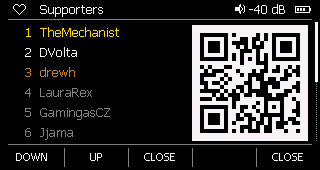
No account needed to download, no telemetry collected, nothing you owe me. Sharing fun things with y’all is the whole point. Still, I’d rather spend my evenings implementing a new feature than choosing between dinner and the electricity bill. If RECHO made your Echo better:
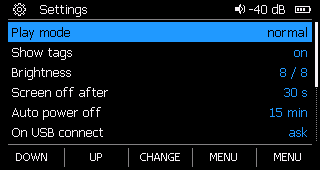
What it does
- Gapless. FUCK YEAH! One track runs into the next without a click or a gap: live albums, DJ mixes, Dark Side of the Moon. Across FLAC, WAV and MP3, across sample-rate changes, and through files stuffed with megabytes of cover art. Check it yourself with the gapless test set.
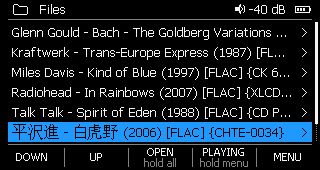
- Navigation, done right. Folders first, then files by name, the way people sort: “2” before “10”, case ignored. No library scan and no ID3 tags mess: the tags only show on the play screen.
- Hold play on a folder to play everything under it, subfolders included. A whole discography takes one press. Custom filesystem driver is a couple of times faster than in the official firmware.
- FLAC and WAV, 8 to 192 kHz, up to 24 bit, and MP3 up to 320 kbps, decoded on the chip’s second core (with its hardware accelerator for FLAC).
- No snake oil for “digital sound improvements” by obscure parameters no one measured or understood.
- Volume in decibels, 1 dB per press (capped at −10 dB in this firmware). Finally you can listen at a low volume.
- Play modes: in order, shuffle, repeat track, repeat all. Resume at power-on from the folder or the track.
- microSD, FAT32 or exFAT, next to the internal storage.
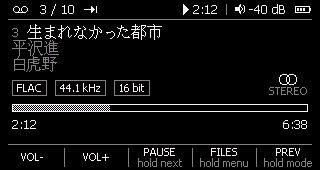
- Tags on the play screen: title, artist, album and track number, from ID3v1/v2, APEv2, Vorbis comments and RIFF INFO, wherever the file keeps them. Or turn them off and see file names.
- Settings in a text file,
RECHO.CFGin the root of the disk, readable and editable on your computer. - Battery-aware: the CPU scaling according to the load, the idle core sleeps when not in use.
- Compatible with the official firmware update process. Just put the official .IMG file to revert.
- Source code will be published after the project matures and when I figure out licenses for file formats and the Rockchip RKnano SDK.
What it doesn’t do yet
This is an early release, tested on one player. It shouldn’t hurt your device, but installing any third-party firmware is at your own risk.
Make sure you know how to recover a bricked device or have someone who does.
- FLAC, WAV and MP3 only. No AAC, ALAC, APE, Opus, etc. (yet).
- The 8 GB model is the only one tested.
- microSD is read only: the player plays from the card but never writes to it, and over
USB you only see the internal storage. Settings, the log and firmware updates live on the
internal storage; an
.IMGon the card is ignored. - No USB DAC mode: over USB the player is a disk or charges.
- No fast forward or rewind. (work in progress).
- No playlists:
.m3ufiles are not read (yet). Play a folder instead. - No cover art, and tags are only shown on the play screen. Browsing is by folder and file name.
- Some tags aren’t read: Lyrics3, and compressed, encrypted or whole-tag unsynchronised ID3v2. Tags in a local code page (cp1251, say) that claim to be Latin-1 show up as accented Latin; UTF-8 and UTF-16 tags show as they should.
- 400 tracks per queue. Very large folders are browsed a page at a time and take a moment to page through. I’m still exploring the performance limits.
Install
Only supported on the 8 GB model. It might work on a 512 MB device, but it might as well brick it. Make sure you understand the risk and know how to recover a bricked device.
- Take the microSD card out while you install, as the stock updater asks.
- Connect the player and open its USB disk.
- Copy
HIFIEC90.IMGto the root of the disk. Keep the name exactly as it is and leave no other.IMGfile there. - Eject. The player installs the image and restarts by itself.
Music, files and folders stay where they are; nothing is reformatted.
Going back to the official firmware is the same: copy Snowsky’s HIFIEC39.IMG to the root
and eject. Switch either way as often as you like. The updater and USB disk mode live in the
firmware’s first module, so the way back doesn’t depend on anything else being intact.
Keys
| key | press | hold |
|---|---|---|
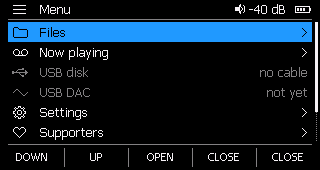
| menu | files ⇄ now playing | main menu |
| back | up a folder, previous track | next play mode |
| play | open, play, pause | play the whole folder, next track |
| vol+ vol− | move, volume | repeat |
| power | screen on and off | power off |